
This book is dedicated to Robin’s mom, the intrepid Pat Williams, who is probably the only 77-year-old woman in the world with her own podcast that she made herself! And she learned to do it using this book. ;-)

A blog is a personal journal, posted on a web page for anyone to read.
A podcast is, essentially, an audio blog; you can listen to a podcast on a web page, in iTunes, or download it to an iPod. Some podcasts include video, but it is much easier and often just as effective to create an audio blog and include still images.
The following pages explain in detail what blogs and podcasts are and show a number of examples of the way some of our friends are using iWeb and GarageBand to post their creations.
What You Need
This book assumes you have three things:
1. A Macintosh computer.
2. The iWeb and GarageBand software. These are both included in the Apple software package called iLife ’06 (or later). If you bought a new Mac recently, iLife might already be installed.
You’ll use iWeb to create a web site to hold your blog and podcast, and you’ll use GarageBand to create your podcast.
3. A .Mac account. This account costs $99 a year, but the perks it comes with are invaluable. There is no easier way to post web sites, blogs, and podcasts, plus there are so many other benefits. Just go to Apple.com, click the “.Mac” tab, and either sign up for an account or get a free sixty-day trial.
What is a Blog?
A blog can be like a diary that’s available on the Internet for anyone to read, or it can be a source of valuable information in your area of expertise. Blogs can range from a minute-by-minute update on a developing news story to yearly updates on Grandma’s pet cat—and everything in-between.
Blogs are often just forms of personal expression, places to rant, complain, observe, ponder, criticize, honor, praise, preach, report, or ramble. A blog can provide important information to a class, business associates, family members, or any other group.
Blogs have become a very important means of disseminating information, as well as developing a community among like-minded hearts and souls.
The ease and immediacy of blogging has made it a popular and useful phenomenon. If you can type, you can blog.
Why create a blog?
There are probably almost as many reasons to blog as there are blogs. Some blogs are outlets for self-expression and creative writing, while some are centered around discussions of social and political issues, news, technology, and anything else you can think of. Many of the most popular blogs are informative and offer instruction or guidance.
Blogs you create in iWeb can include a feature that allows you to receive comments from readers. This can add another level of communication to a blog—family, friends, or associates can use the blog as a communication tool rather than just a one-sided newsletter.
A blog can help organizations publicize themselves and keep current information available either for the public or for select personnel. The head of a company, church, school, or any other type of organization can maintain a constant dialog with associates, students, and other interested parties.
If you have something to say (or think you do), blogging is for you.
What is a Podcast?
A podcast is an audio blog—you listen to it rather than read it. It’s like having your own radio show that everyone around the world can tune in to whenever they want, not just at the moment you happen to be recording or broadcasting. Podcast episodes are placed on a website, where people can subscribe to them. Subscribers are automatically notified when a new episode is available—by the podcast player software installed on their computers (iTunes for Mac users). But listeners don’t have to subscribe to a podcast to listen to it; anyone with access to the podcast’s web address can go there and listen.
Listening to episodes on your computer isn’t the only way to enjoy podcasts. One of the biggest attractions of podcasts is that they’re portable. Anyone with an iPod (or some other MP3 player), can transfer episodes from a computer to their player and listen when and where it’s convenient—in the car, while grocery shopping, at the gym. This is how an increasing number of people stay updated with their favorite news, sports, and entertainment sources.
Most podcasts are simply audio files. It’s easy, however, to create enhanced podcasts that include graphics, photos, and even web page links. As you’ll learn in Chapter 6, it’s easy to create an enhanced podcast, placing photos or graphics in a timeline so they appear precisely when you want them to appear.
Video podcasts are also popular. They’re as easy to make as audio podcasts if you have a video camera and know the basics of editing video in iMovie (see Chapter 10). A video podcast (also know as a vlog or video blog) is a movie file that’s been compressed and resized (smaller) to a format that’s compatible with the web.
Video podcast files are much larger than audio podcast files. They take up more room on your web site’s storage space and they use more bandwidth when viewers watch them. If your podcast gets too many viewers, your web host provider may charge you extra for bandwidth usage.
Why create a podcast?
Podcasts will become as ubiquitous as web sites and blogs as people realize how useful they are. For instance, one podcast that you’ll see examples of throughout this book allows members of the Mary Sidney Society around the world to participate in monthly luncheons that are held in Santa Fe, New Mexico. They can listen, at their convenience, to podcasts of the presentations. Members can even create their own podcasts so we can play them at the luncheons or broadcast them on the society site.
Examples
On the following pages are a few live examples of blogs created by people using iWeb, as well as podcasts by people using GarageBand and iWeb.
Community pages
Robin’s mother, Pat Williams, heading towards 80 years old, maintains a blog and podcast for the retirement community in which she lives. She creates it all on her Mac, and even though many of the other retirees use PCS, they can listen to and enjoy her reportings of the goings-on in the community.
Pat volunteers for the Yountville visitor center (say hello when you stop in) and posts web pages of events. Thank goodness for the Mac—it keeps her off the streets.

web.mac.com/dearpat
Entertainment
Clayton Lobaugh is an enterprising young teen who, sometimes with the assistance of his friend Antonio Marquez, channels a lot of energy into making hilarious video podcasts (see Chapter 10 for tips on making video podcasts). As Clayton says, “Podcasting is a brilliant way of creatively using self-expression. I’m having a ball making these podcasts, but the main reason I am doing these is in the hopes of making people laugh because most people need to lighten up. If someone sees my site and cracks a smile at the antics of that ‘crazy red-haired kid,’ then my work here is done . . . not literally, of course. (In my podcasts, any resemblance to persons living or dead is ‘purely coincidental’).”

web.mac.com/claytonfunnyguy

Clayton creates video podcasts.
Professional use
Marketer Louise Roach and web designer Hope Kiah formed the Web Marketing Mavens as a vehicle to share their skills in search engine optimization (SEO).
They teach workshops in web marketing for beginners, and on their site they offer a web marketing blog and a free podcast about marketing.

When planning their web marketing, Hope and Louise knew they needed a carefully optimized site built in a high-end web design application. But they created their podcasts with Garageband, iWeb, and a .Mac account and linked their main web site to the .Mac podcast—and vice versa. The iWeb site closely matches the original site design so visitors won’t even notice they changed servers.
Their “recording studio” is an echo-absorbing walk-in closet, complete with clothing! Hope added the podcast to the iTunes Music Store directory where it can be found by typing “podcast on marketing.”
Journals of all sorts
Denise Kusel is a journalist who’s taking off on a road trip across the country. She plans to spend time in campgrounds talking with people about what’s happening in our country and how they feel about their lives. Along the way, she’ll be using her cell phone to connect to the Internet and her iWeb site to blog and podcast her stories. Her blogs include comment links so readers who follow across the country can also share their stories with her.

web.mac.com/dkusel
Broadcasts of meetings
The Mary Sidney Society has a monthly luncheon series with a twenty-minute presentation at each meeting. So that members around the world can “attend” the luncheons, we podcast the presentations. And if someone from outside Santa Fe wishes to do a presentation, they can send us a podcast and we can use that as our presentation at a meeting. The world is getting smaller all the time!
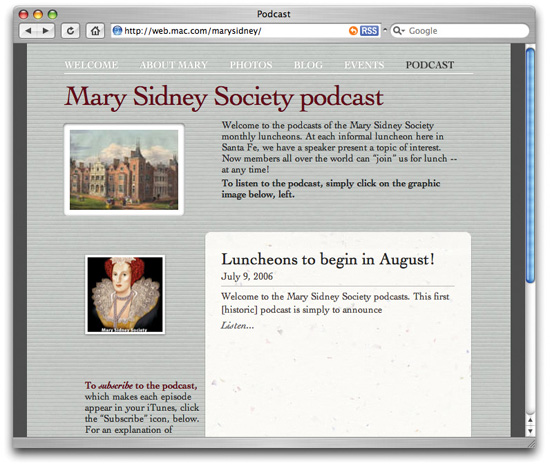
web.mac.com/marysidney

These podcasts will include photos from the presentations.
Companion sites to other projects
John Tollett wrote a great little book, Macs on the Go, about traveling with your Mac laptop and getting connected anywhere in the world. John can even get connected in a phone booth in Cameroon.
What would have been a daunting task—to develop a special companion web site for a book—became a half-day job using iWeb and GarageBand.
iWeb makes it easy (and fun) for him to update information and to add podcasts and other interesting items, such as tips, blogs, and anecdotes.
The site also makes it easy for other Road Warriors to contact him and add their own mobile adventures.
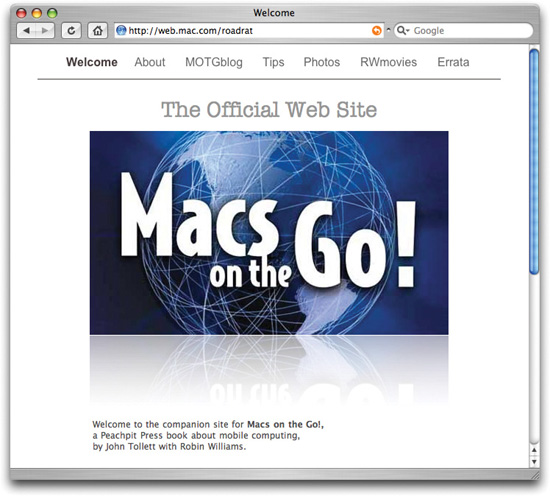
web.mac.com/roadrat

John’s blogs include great tips for mobile computing.
Finding Published Blogs and Podcasts
There are millions of blogs and podcasts out there. Fortunately, finding one that interests you is not as daunting as it might seem. Every day, new blog and podcast directories are being published, some of them quite specialized. For instance, BlogHer.org focuses on blogs by women (or men who are writing about women’s concerns). Technorati.com ranks sites in order of popularity based on how many links go to a particular blog site.
Use a directory
In your browser, search for “podcast directory” or “blog directory” and you’ll come up with many sites that categorize podcasts and blogs. Either browse through their lists of sites or use their search feature to find a blog or podcast on a particular subject.
If you find a directory you like, you can even submit your blog or podcast to them (find their “Submit” or “Add your Podcast” button; see Chapter 9).

Use iTunes to find podcasts of interest
iTunes has a directory of podcasts that have been submitted to and approved by Apple. An advantage to using iTunes to find podcasts is that you can immediately listen to them and even subscribe to them through a program you are familiar with, and you can easily download them to your iPod, just as you would music.
One way to find the directory in iTunes
1. Open iTunes.
2. In the Source pane on the left side of iTunes, click on “Music Store,” as shown below.
3. In the genre pop-up menu, circled below, choose “Podcasts.” Now you can search, browse, narrow down the categories, etc.

Another way to find the directory in iTunes
1. Open iTunes.
2. In the Source pane on the left side of iTunes, click on “Podcasts,” as shown below.
3. This not only displays a list of the podcasts you have subscribed to, but there is also a link to the directory in iTunes, circled below. It takes you directly to the screen shown on the previous page.

An Overview of the Blog Process
Before you begin, here is what you can expect to do to get your blog created in iWeb and posted to a web site hosted on your .Mac account. We assume you’ve got the Apple software iLife ’06 and a .Mac account[*] (as explained on page 3).
1. Open iWeb and create a “Welcome” page. You can do this in less than five minutes.
2. Add a “Blog” page.
3. Use the “Entries” page to create a new blog entry. Edit the page, edit the text, add photos, etc.
4. Click the “Publish” button.
5. View your site on the web!
An Overview of the Podcast Process
Before you begin, here is what you can expect to do to get your podcast created in GarageBand, added to your iWeb site, and posted to your .Mac account. We assume you’ve got the Apple software iLife ’06 and a .Mac account[*] (as explained on page 3).
1. Open GarageBand and talk to your computer to record your podcast.
2. Edit your podcast, if you like—add or delete audio, add photos, music, chapter markers.
3. Choose the Share menu to “Send Podcast to iWeb.”
4. Edit your podcast “Entries” page in iWeb.
5. Create at least a “Welcome” page in addition to the podcast page (if you don’t already have one).
6. Click the “Publish” button.
7. View your site with its podcast on the web!
8. Submit to iTunes with a few clicks of the mouse.