
Over the years I’ve seen many mistakes happen in various parts of the website maintenance process. All humans make mistakes. As lovable as we are, it’s simply bound to happen. We have to allow for humanity to happen and even plan for these errors by having a staging process. Staging servers allow us to test before we update and therefore roll out pages with minimal drama. Web development roll-outs can happen either on a scheduled date or at the developer’s discretion (unscheduled). If you are clued into the timing of the website updates, then you can monitor for issues as well as document when changes are rolled out in analytics. If you spot a bump in traffic or a dip after an update—how handy to be able to figure out what happened! Clear annotations in analytics help everyone understand the true impact of a website’s performance on SEO.
Setting Up for Ascendency
Let the analytics for your site guide you meaningfully to understand what the user really wants from you. If visitors are staying on your site three times as long when they arrive from organic search rather than paid, consider tweaking those paid campaigns a little more or revisit where you’re sending them. Site bounces from paid traffic should be analyzed separately from organic traffic, because the use cases are different.
One of the first pieces of building a website is determining the architecture. It’s very popular to use tools like all-in-ones (Marketo, Eloqua, etc.) and automated help desks (Zendesk, Basecamp) because they accomplish critical tasks. Convenience often comes at a price for technical SEO. Therefore I am cautious about overuse of some tools, because each tool slows down page loads by making server requests. It is also beneficial to have control over your own content. Giving up one’s own content should not be done lightly. There are instances when hosting content elsewhere is crucial for performance, like in the case of video streaming.
There was a long stretch in the mid-2000s when it was common to see third-party tools get opinionated about changing URLs completely, which users didn’t necessarily trust. Then everyone got the idea to create microsites with thin content to get more links back. Eventually, penalizations started to happen so microsites fell out of fashion as an SEO tactic around 2010 and we saw the rise of subdomains. Microsites are still very much in fashion for campaigns, time-based projects, and other fun on the web. The popularity of subdomains arose via services that wanted to give a slightly more branded feel. Subdomains were once quite unpopular, because namespace configuration was difficult until widespread consolidation of hosting services like WordPress came along. There’s another way to think about it: a popular strategy to add functionality to a site also generally means farming out content. It is extremely common in 2016 to use a subdomain within a homepage navigation for services provided, such as Zendesk for customer support or Shopify for ecommerce.
For the search engines to recognize the relevance of a domain, there has to be enough content there to garner user interest. Don’t give all your power (content) away. The largest sites on the web either house their own content or aggregate other sites’ content.
The issue with turning one’s content over to another third-party content host is that with each click to an outside site, you’re losing your own users. Be careful to distinguish third-party hosts from CDNs like WP Engine, and use CloudFlare so that the site gets served from servers all over the world nearest the users. Your content should remain under your own control; you can route what’s coming from your server on your own domain. If you don’t examine the path your own users take, you can unwittingly start kicking users out of your own site. In some cases, users are actually forced to leave the site that brought them. Ofttimes content that should really be on the homepage is housed on these outside services. There are exceptions to this, like when using a service like Medium for the company blog. One can see some benefits for using Medium as a host, because you’ll be able to use a subdomain whilst getting your blog posts in front of many other eyeballs. The biggest concern with using Medium or other third-party content hosts for your blog is the potential for analytics to not line up seamlessly.
Meta Information
Many folks still believe that SEO means simply populating your website with meta information. Meta information is a basic branding tactic, not a shortcut to success. It’s a fundamental piece of search appearance. Meta titles and descriptions end up showing in search results, so for that reason alone they matter to SEO (Figure 7-1).
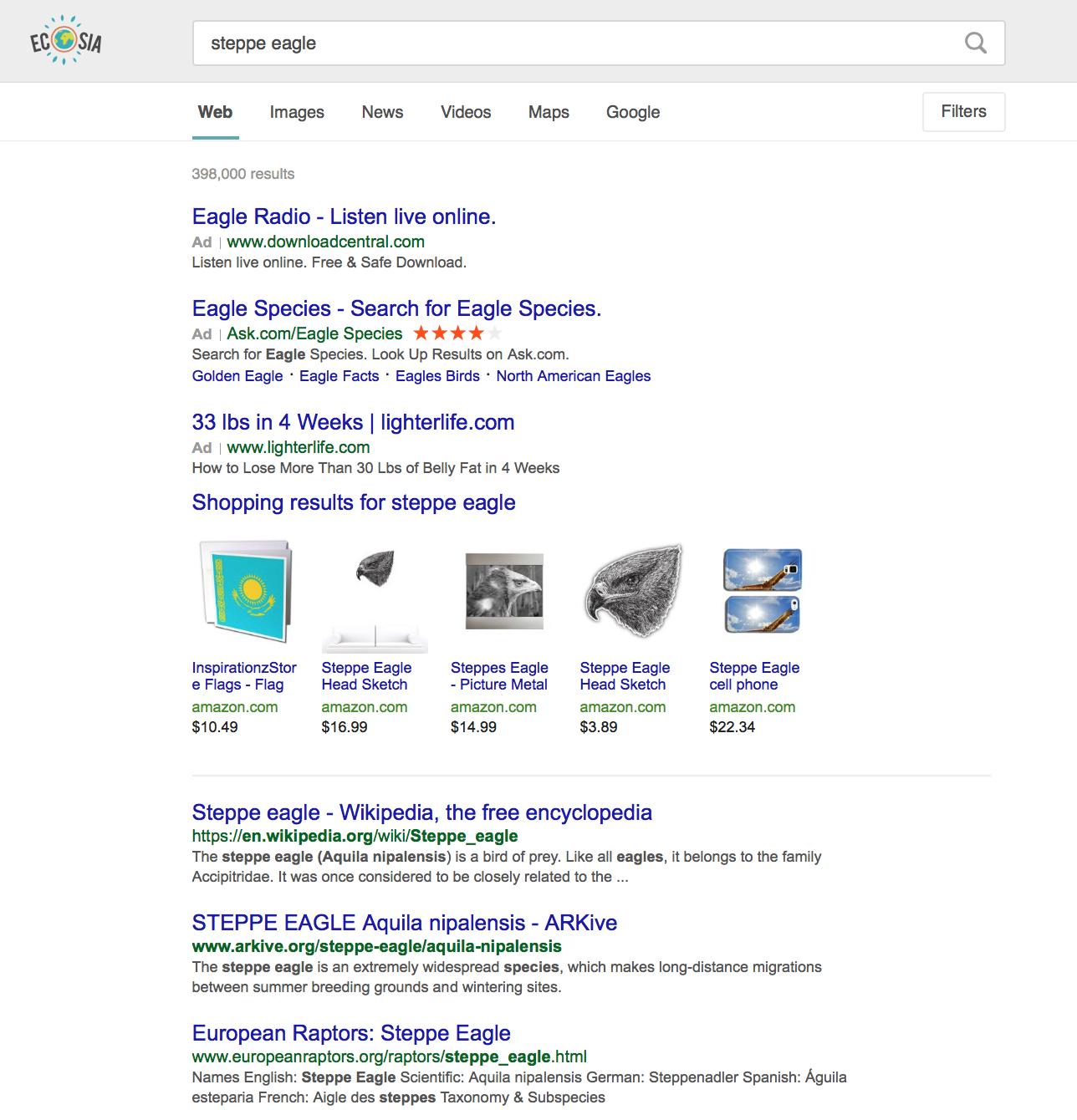
Figure 7-1. This shows us the titles and descriptions for a query of the steppe eagle.
In Figure 7-1 only one site appears to have optimized their meta description, because it’s not cut off with “...” like the others. However, upon further examination of the source (Figure 7-2), it’s a complete coincidence that the meta information was pulled in perfectly.
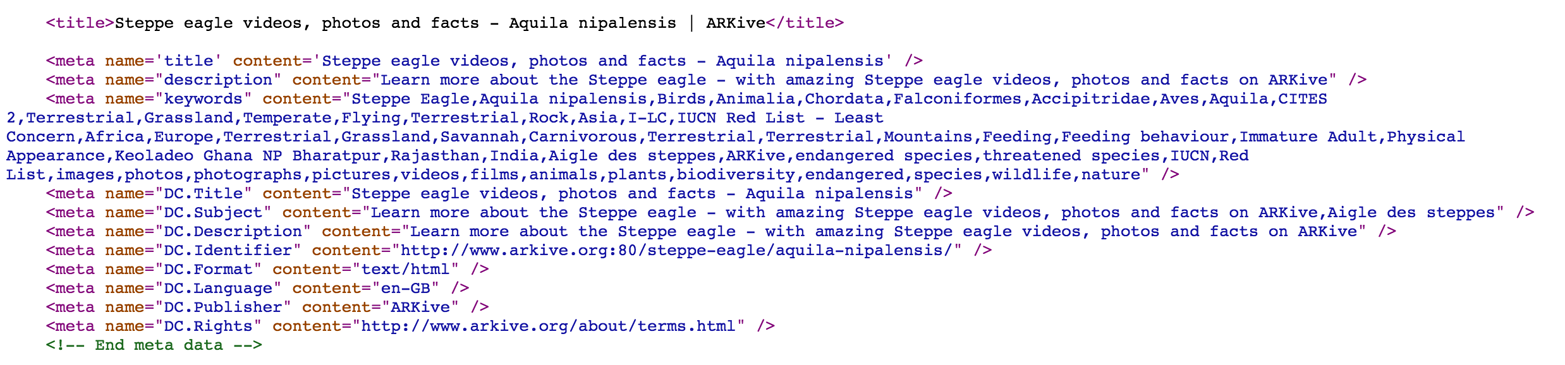
Figure 7-2. While the site appears to have entered a meta description, it’s not pulling into the search results.
Always check the source of the site you’re optimizing against what you see in the SERPs, because it’s often more than meets the eye (Figure 7-3).

Figure 7-3. After searching the text, the description that appears in search is actually the H3!
Site Usability
Search interest is not enough to maintain rankings; there has to also be search excitement. Do people come to your site and feel satisfied? The user interface is everything to SEO. Your users’ experiences are critical to getting them to spend more time on-site. Designing a site with an SEO-forward approach can drastically improve a website’s usability and performance. Search engine algorithms punish sites that aren’t responsive to multiple form factors. Therefore, designers absolutely need to ensure their sites look flawless on every kind of device.
Usability comes in many forms, not all of them viewable to the naked eye. There’s a difference between user interface (UI) and user experience (UX). User interfaces are how something appears, the look and feel. UX is the process of enhancing user satisfaction and accessibility. Usability should be the totality of any potential website visitor’s experience on your URL. Try to weigh your desire to load a fun MIDI version of Louis Armstrong’s “It’s a Wonderful World” for all of your potential customers against the fact that they’re probably on a mobile phone and will find any music disruptive. Usability is just like getting hugs; they’re best when you don’t think you need them.
Website development issues we are going to address include:
· UI/UX
· Staging process
· Site optimization
· Site hosting
Ensure that navigation is intuitive and make sure to include clear links in at least the footer to privacy policies, about pages, and contact pages. Quick accessibility to basic information makes a site more usable and a company appear more credible. Properly accessible information for a business will ensure the best mobile experience as well. It’s also essential that your site has a clear and logical URL structure that identifies what your site is about. Logical URL formation is not the most fun thing to think about, but helps build user trust. If your company name is the coolest name ever, then use that as your URL. Too much mystery in the URL versus what is seen will make things murky for the user.
Simple and straightforward navigation generally works best. Don’t get fancy with the menu options; people won’t dig it. There’s also no tried or true SEO benefit of a menu structure so it makes sense to go with, well, what makes sense for your respective page. Does your organization spend a fair amount of time writing amazing blogs? Great, then put blogs in your top navigation. Have you only ever gotten one press hit? Then maybe don’t put a press page in your top navigations. I’ve seen companies struggle with calling press hits “buzz” instead of press because they think it’s more interesting. There’s no hard and fast naming scheme for the top navigation menu of your website, especially for standard pages like your company’s contact pages or blogs.
When I think of logical URL structure I typically follow this schema:
· steppeeagles.com/buckets
· steppeeagles.com/buckets/keyword-specific
Here are some items to consider when setting up a website.
1. Testing is definitely key. There are various validators to make this easy and bulletproof.
2. If you don’t provide schema data, you’re leaving it up to the various platforms to make a best guess at what you want for title, thumbnail, description, etc. Providing the schema data ensures you get it right.
3. Different platforms let you choose the default sharing format for a post using schema. For example, Twitter let’s you choose the layout for your shared posts. Check out the Twitter card types here: https://dev.twitter.com/cards/types.
4. You should check how your posts look on any platforms that you see shares coming from, even if you don’t use those platforms.
Those are the main points to think about. It’s as much about the social networks as it is for Google.
The first time I ever heard of a six-pack was when a colleague was describing the broken out results a company gets (or doesn’t) under their organization’s name (see Figure 7-4). If we do everything right in the URL structure of the site and the pages are weighted appropriately, we enjoy the glory that is the six-pack appearing how we want it to. Most companies I’ve worked with have some sort of issue with their six-pack. Don’t fret—even Google does!

Figure 7-4. Note: the Gmail description—it’s hilarious! Perfection is always a noble goal.
The consistent method I’ve used for getting a company’s results to look the way I want it to is with clear navigation and internal linking.
Try to go easy on the JavaScript. Though it is great for making websites look pretty, be sure to use it wisely (sparingly). Too much JavaScript can have a negative impact on your performance, but typically only when it’s too much.
Clean that code. Website creators need to keep their code nice and clean (think simplified, not bloated), which means not stuffing web pages with so much content that visitors don’t have a clue what’s going on. If a site has badly organized content, it confuses the users. If a site has too much code, it complicates things for search engines, which can detect problems even if the site displays properly in the browser.
Here are some ways to boost your site’s performance on the server level:
1. Optimize those images by compressing them with a utility. Consider CSS image sprites and plugins like WP Smush.
2. CSS image sprites are very useful because they put less stress on the server (unless you’ve already pushed to HTTP/2, which allows you to have numerous simultaneous downloads without having to establish a new connection for each one). Google advises against this now as they are way into HTTP/2. Using CSS3 techniques for styling your webpages can boost performance better than leaning on JS can. This keeps it cleaner.
3. Combine HTML5 with CSS3. These two work in tandem to make sites sleeker, cleaner, and faster. HTML5 provides lots of advanced functionality compared to older HTML, and is flexible so it can be scaled down as your media requires. CSS3 not only reduces page loading times but also helps give sites a more interactive feel about them. Just be sure that your code is kept squeaky clean so the HTML validates properly.
What truly comes at the heart of usability? The user. I have spent so much time advocating for the user that it now comes as second nature. Every SEO has to consider the usability of a site as a factor that matters for success. Interactive elements are fun and, when done correctly, they enhance a user’s experience on any given website. The issue with elements done in scripting languages or external programs is that they can bog down the browser mercilessly. Always try to consider that the person coming to your site won’t have a single asset cached, so unless you’re super deliberate about using a scratch browser to test, any new users will have a longer load time than you do. Avoid using Flash and other interactive elements that will adversely affect performance. Flash technology has largely become obsolete, so it’s best avoided if you’re building a new website. Many devices and browsers aren’t even compatible with Flash, or they simply block it altogether.
CLEAN BROWSERS
As a search practitioner, you have to accurately perceive the battleground you’re on in order to attain successful outcomes. Projects fail for numerous reasons, but not always because of what’s happening online. It’s imperative to perform, at the very least, a cursory search on various platforms before hiring or working with anyone—even a potential client.
I also recommend searching two varieties of browsers: the one you use all the time and then some scratch browsers. The scratch (test) browsers are ideal to do extra non-cookied, not-logged-into-anything searches. I call these clean searches. An easy way to create a new scratch browser is to establish another guest account on your own machine and not import any bookmarks or logins to that user’s browsers.
Personal note: I use scratch browsers for purchasing travel tickets as well, because prices go up fast once you start accumulating cookies.
Setting the Stage
This section will cover the staging process, site hosting, and optimization. There are no formal standards, but there are definitely some best practices in terms of website performance. Mobile users demand speed without provocation. The amount of time a user will wait for a site to load decreases more and more over time. Projects like Facebook’s Instant Articles and Google’s Accelerated Mobile Pages (AMP) project are spoiling users with amazing load times. The rest of the world’s hosts will have to catch up, too.
Websites designed and implemented without forethought (for the audience) do not perform as well as those that have considered them. Are you loading a bunch of junky CSS? Are your cache expirations set? Take out the trash; optimize the code. Think about how many subdomains you’re using and servers you’re maintaining. Don’t cut corners on performance optimization; deploying a WordPress template out of the box isn’t good enough anymore, at least not for mobile. There are some out there that are fast, but you may as well build your own if you can.
Just like acid-wash jeans, fun webby doodads eventually go out of style (and only come back in style “ironically”). Toss out your pop-ups and Flash on mobile sites. Keeping poorly performing older elements will no doubt alienate site visitors and send them packing. If you have to utilize ads on your websites for revenue, there are more subtle ways to do this than flyovers on mobile. There are ways to monetize that do not alienate your users.
There are logical places to cut costs in a marketing department, but they should be based on operational need. Following W3C is always advisable for validation. By following modern standards, you promote common data formats and exchange protocols, known as RDF.
Hosting is not the place to cut costs, ever. Would you cheap out on the foundation of your house? No. Bargain-basement hosting is a bad idea. Avoid the cheapest ISP hosting packages because they will try and often succeed to failboat your SEO efforts with CDN hijacking. A company should own search juice from its own content and go as smart as possible on hosting. There’s a sweet spot. $20-$30/month is worlds better than $5/month. The super cheap hosting crams tons of sites onto the same box, making performance unpredictable and making you vulnerable to security breaches if the other sites are poorly implemented, which they probably are if they’re on cheap shared hosting. Larger hosting packages allow the webmaster to customize and optimize all the right stuff. Avoid bloated API packages for tools and services, as they can slow things down dramatically. Ideally, the host would be HTTP/2-compatible so that speed and performance are as premium as possible.
Secure Sockets Layer (SSL) is the de facto security technology for creating encryption between a web server and a browser. Data that is passing between a web server and browsers must stay secure. Instances like taking payments or sharing private information on mobile will always call for enhanced security. SSL on a website is the bare minimum level of security that should be performed, whether it’s mobile or desktop.
SSL FOR EVERYONE!
“SSL everywhere” is the rallying cry of Let’s Encrypt, an emerging, free, automated, and open certificate authority (CA). It’s a non-profit that endeavors to become part of the plumbing of the internet. So cool. They are even working on their own protocol named Automatic Certificate Management Environment (ACME) to de-chore-ify the entire process. I am a fan of anything that helps democratize the internet and enhances security at the same time.
In that vein, if HTTP/2 and the like are increasingly requiring SSL, we must ask why aren’t all sites using it? Administering SSL certificates can also be a chore. So potential costs coupled with inconvenience cause many developers to put SSL deployment off until later (or just skip it entirely to save workload). Bad move! Security certificates are essential to the health of secure website. Self-generated certificates are not a great solution, because not only does everyone have to click through scary security screens, but it’s more scary than no padlock at all. A scary experience lowers the bar of sensitivity to scary security screens thus making security adoption far worse for everyone in general.
While I cannot endorse any specific hosting services or packages, I would suggest reading user reviews along with industry expert reviews (or endorsements). If one service is slightly costlier than another but has more bells and whistles that you need, the internet will tell you if the potential upgrade is worth it or not. Depending on resources available, some managed services are pricey but worth it.
Try to avoid unknown or international hosting companies unless there’s a compelling reason, like you are running an international site yourself. The main reason to avoid them is the support; it’s hard to get tech support when your schedules are flipped. Also, sometimes standards can be different among countries and you don’t want to be a victim of circumstance.
DON’T GET A HOUSE ON SPAM STREET
Working with a large and spammy host can result in some issues you may or may not realize. You can be judged by the company you keep (on the C block). I’ve heard many SEOs refer to the “Bad IP Neighborhood” which means your IP could be in range of spammers. Oh noes!
There are a number of utilities you can run to find the quality of your IP neighborhood, so no need to worry.
The Block and Tackle
From server speed to CMS systems and their by-products, there are technical elements in need of handling. This section will cover the basics of technical elements to consider with regard to SEO. When we fail to consider what’s happening behind the scenes, we fall behind in terms of site performance. It’s not easy to optimize a site, pull out unused CSS, and reduce bloated JavaScript, but with hard work your site can reap the rewards. Strike a balance between JavaScript code size and the functionality it’s meant to serve.
It’s good to think of the browser like an operating system or a compiler. Every script and piece of tracking we deploy within a site is essentially a piece of software we are making the browser sift through. Leaving junk in the source code for the user to download leads to longer load times. Until you’re able to migrate to HTTP/2, it’s good to stay hyper aware of what assets are looming on a site’s servers. Too much hang time on load starts to feel like downtime to the user, which means they’ll click away. A user that has bad experiences on your site is not likely to come back. In the worst case, a user will go to social media or networking sites and out you.
TOO MUCH TRACKING GETS TACKY
It’s rousing for marketing departments to start learning more about user behavior. We acquire bounteous user information by throwing in an egregious amount of tracking scripts. Eventually we will ask the browser to do too much. We’re using the browser as software, but we’re also asking the browser to compile software on-the-fly.
Cache is king. Use the cache! Many developers use out-of-the-box WordPress templates to save time and expense. It’s OK to use templates, but they typically do not have performance-related bells and whistles for superior performance. If you don’t have the resources, then try a host like Medium, which will host you for free and give you access to a sizable content network distribution. However, Medium does not plug in any outside analytics tools yet, which is unfortunate.
Site Architecture
Setting up a site properly and logically enhances the user experience and therefore SEO. It’s crucial to think about the future of a site, not just the current day. If you think hierarchy is a golden ticket, this is not true.
Developers and marketers should work together to build the following technical strategies thoughtfully:
· Network topology
· Subdomain management
· Meta Information
There’s a fair amount of confusion when it comes to subdomains and SEO. It’s been debated whether subdomains (cool.steppeeagles.com/) are better to use than subdirectories (steppeeagles.com/cool).
The trick of diverting juice amongst properties on your own servers within a domain is over. There was a time when subdomains or microsites could be used to boost credibility between sites. It’s more important to be consistent in your architecture than to pick one precise method.
Personally I prefer subdirectories to other alternatives like different domains because the former do not keep all content under the same roof. It’s far better for your future site management to keep them in the same tent, however I cannot report in ten years any appreciable difference in performance for subdomains over subdirectories. Google has said that hierarchy is up to the individual site operator and no magic can be gained by implementing either one. A compelling use case for deploying subdomains is when you’re performing SEO for sites in multiple languages.
Another consideration for webmasters and SEOs alike is dynamic versus static URLs. If you choose one versus the other for URL structure, it isn’t the end of the world. If your pages are completely different, dynamic service may be the only way to go. Static pages are increasingly popular for performance reasons.
Site Canonicalization
When you change a URL, be sure to redirect it correctly. Do not trust that the user will work to find out where your content really is; they’re already gone. The best change for the user to have is no change at all. So zen, right?! But seriously, pick one methodology early, and then stick with it. Document structures accordingly.
When teams grow and personnel changes happen, the details of server configurations can become hard to keep track of. Even query strings can throw off the best of the algorithms. Remember, we want robots to know what we’re doing. This solves the duplicate content problem. We always have to consider what works from the perspective of the robot.
Canonical URLs/namespaces are an important computing concept to understand. A canonical URL is a container or holder in computing lingo that describes related objects, which makes it possible to distinguish between different items. Another way to think about the namespace is a hierarchy of files and directories. Normalize the namespace! Think about it. It’s kind of fatuous how many patterns for the same thing there are in the most commonly used web servers.
For Apache/NGINX, these are the common patterns:
· www.steppeeagles.com/article/
· www.steppeeagles.com/article/index.html
· steppeeagles.com/article/
· steppeeagles.com/article/index.html
For IIS, the situation is even worse, depending on version:
· http://www.steppeeagles.com/
· http://www.steppeeagles.com/default.asp
· http://www.steppeeagles.com/default.aspx
· http://steppeeagles.com/
· http://steppeeagles.com/default.asp
· http://steppeeagles.com/aspx
It’s case insensitive.
If you don’t have redirects all over the place, use canonical URLs as thoughtfully as possible. Pick a style and then stick with it; consistency is the key to easy updating.
Here are a few things to consider about canonicals:
· A good canonical structure looks something like this: .
· 302 redirects are worthless. If you think about it, it actually makes sense. I mean, it’s a temporary redirect.
· Either one’s OK, but “www.” being secondary is the cool trend these days
· Best bet, don’t monkey with it! No sojourns. Even a 301 redirect can cause a 15% drop-off.
Video Handling
For many years short videos have been rising in popularity, because people like to snack on media, not have a whole dinner. A short video with captions can really enhance a site’s ability to present information to visitors. Mary Meeker’s annual trends report always reveals a pantheon of scintillating data revelations and predictions. In 2016 she predicted the overwhelming domination of video and video platforms as a means for content distribution. The adoption numbers are staggering and there’s no denying that video is the king! We want to enjoy little bits without much thought and often we can with little to no consequence within the realm of social media.
We like to watch our videos on social and to keep them short, sweet, and captioned. Videos with captions allow the user to watch in silence while at work or anywhere else. The interesting part is while video is thriving, due to the silence, video advertising is suffering. Social media endorsements are at an all-time high; YouTube is actually considered one of the top search engines that everyone tries to remember to SEO. Video SEO shouldn’t be an afterthought, and it’s not as simple as punching in some keywords for the descriptions.
Don’t forget about thumbnails! Video previews are way more important than people give them credit for. Make sure the thumbnail is a true depiction of what the user is expecting to see. Tricking a user is never a great idea.
Streaming video can be done through sites like Ustream, YouTube, Vimeo, Daily Motion, Vine, and Instagram. Video chat services are Facebook Live, YouNow, Periscope, and Twitch.
YOUTUBE SEO TIPS!
Video SEO always has a twist to it because the hosting tends to be external. YouTube is one of the largest search engines, so we must think about it in terms of search.
Although the maximum description length is 5,000 characters, they trim that to 120-160 characters in the search results. The most important part is the first sentence of the description. Lead with the part you want to be read.
For any of the keywords that you’ve entered, it’s generally good practice to include them at least once in your description. However, the description needs to feel organic, so you don’t want to stuff keywords into sentences just for the sake of including them. If you can’t find room for them, better to leave them out. Add a link back to a relevant blog post immediately after the first sentence. You may need to experiment to get the placement right, but when it’s done correctly the link will show up above the “show more” button.
CMS Management
Content management systems make for the easiest updating of websites by various technical competencies across an organization. Many companies utilize a CMS system for website management and this is expected to continue for the foreseeable future. These systems come with all sorts of plugins, tools, and predesigned templates. Without a web development background it’s difficult to discern what you’re getting with a package or the purchase of a website from a contractor or agency.
Setting up CMS systems on websites is fairly straightforward, but clearing out the junk that comes with these systems is far more difficult. Templates are very easy to come by in the world of popular content management sites like WordPress, Joomla, Prismic, or Ghost. How to pick a theme depends on the amount of resources you have available to deploy the site, and also to maintain it. If your budget is modest, you probably want to keep it simple so you don’t need a developer for text updates; this is where the CMS really starts to shine.
It’s difficult to predict the future in any situation, much less a web server environment. Picking a theme on a third-party site is a delicate balance of trust. It’s good to look for the frequency with which updates are made and how effectively the theme’s creator is in repairing bugs. There’s no perfect theme, and it’s not possible to find a bug-less one. It is OK to go rogue and create your own theme if the project’s web developer is experienced enough, but always remember the thing about islands, which is that they can get lonely.
If you’re using a prebuilt solution with lots of stuff you may not need, then you’ll want to reduce the footprint on your server; it’s inevitable (Figure 7-5).
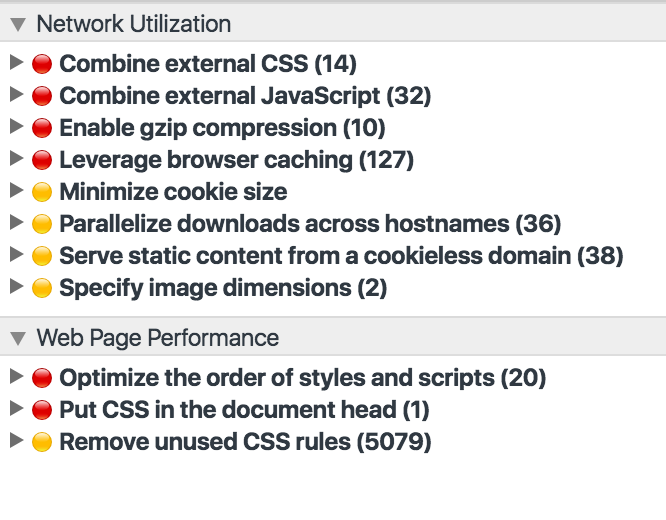
Figure 7-5. This is the typical amount of resources that come with a WordPress templated site, found in Chrome Developer Tools audits.
So you’d like to start a CMS project. What do you ask the developer for?
1. Remove unused CSS, but test all pages. Sometimes subpages use CSS that the homepage doesn’t.
2. Choose a host that has deployed both HTTP/2 and IPv6. If not, it should be in the roadmap.
3. Put JavaScript in the footer when possible to increase load performance, but know that this can impact analytics capture in certain cases.
TESTING IN A CLEAN BROWSER
So many times we’ve rolled out website changes and updates to have the client tell us “No, we don’t see this.” Technically speaking, they do not see the changes because they haven’t refreshed the cache of the browser. They often simply hit the refresh button in the browser. Hitting the refresh (arrow) in conjunction with the shift key refreshes browser cache.
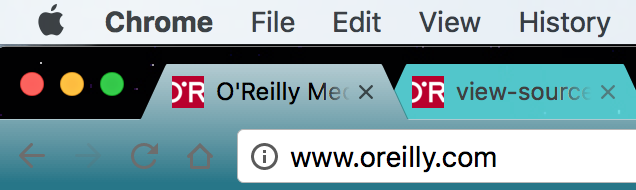
Figure 7-6. Note the arrow shaped in a circle to the left of the home button
Style sheet changes aren’t always apparent, so I like to keep a “clean browser.“ An SEO should always keep a clean test environment, which means a browser that has no sign-ins, no cookies, and no cache.
While content management systems offer everyone in an organization the easiest possible method to update a website, they tend to have drawbacks in performance when left un-groomed. It’s typically OK to use a CMS over expensive proprietary systems or expensive monthly support contracts. It’s better to have the website be regularly updated and relevant to potential site visitors than tuned to the hilt like a sports car.
Performance and usability are no joke when it comes to search and usability. To give users a positive experience is to retain more search economy, because what’s good for the user is good for search. Each visit that’s made is a vote for your site, so make it count.
You’re well on your way to getting into the sweet, sweet technical search zone now. We’ve covered a heavy amount of technical theory and best practices in this chapter. Let’s talk mobile next, because it’s a slightly different battlefield. While mobile and desktop SEO share the same practices, they diverge in ways that we’ll cover in the next chapter.